AI & Automation
How AI WhatsApp Automation Can Turn Customer Enquiries Into Qualified Leads
Learn how AI-powered WhatsApp automation can answer customer questions, understand requirements, qualify leads, update your CRM, automate follow-ups, and hand high-intent prospects to your sales team.
How AI WhatsApp Automation Can Turn Customer Enquiries Into Qualified Leads
A customer messages your business on WhatsApp at 10:47 PM:
"Hi, I'm interested. Can you tell me the price?"
Nobody from your sales team is online.
The message sits there until morning.
By then, the customer may have already contacted three competitors.
This is where WhatsApp automation becomes interesting.
Not because businesses need another chatbot.
But because they need a system that can understand a customer, answer questions, collect requirements, qualify the opportunity, and move the conversation forward—even when nobody is available.
That's a very different experience from a traditional chatbot.
Traditional WhatsApp Bot vs AI WhatsApp Automation
Most traditional WhatsApp bots work through predefined flows.
For example:
Customer: I need software for my business.
Bot: Please select an option:
- Services
- Pricing
- Contact Us
The customer selects an option and continues through a predefined menu.
This works well for simple and predictable workflows.
But customers don't always communicate in predictable ways.
Someone might write:
"We have around 15 employees and currently manage customers in Excel. I need something where my salespeople can manage leads and I can check their performance."
There isn't necessarily a button for that.
An AI-powered system can understand the message and continue the conversation based on its meaning.
What Does AI WhatsApp Automation Actually Do?
Think of it as a digital first-level sales and support assistant.
When someone messages your business, the system can potentially:
- Understand what the customer wants.
- Answer questions using your business knowledge.
- Ask relevant follow-up questions.
- Collect customer information.
- Identify the customer's requirements.
- Qualify the lead.
- Create or update the lead in your CRM.
- Notify the appropriate salesperson.
- Allow a human to take over.
- Continue automated follow-ups when appropriate.
Instead of simply responding to messages, WhatsApp becomes part of your business workflow.
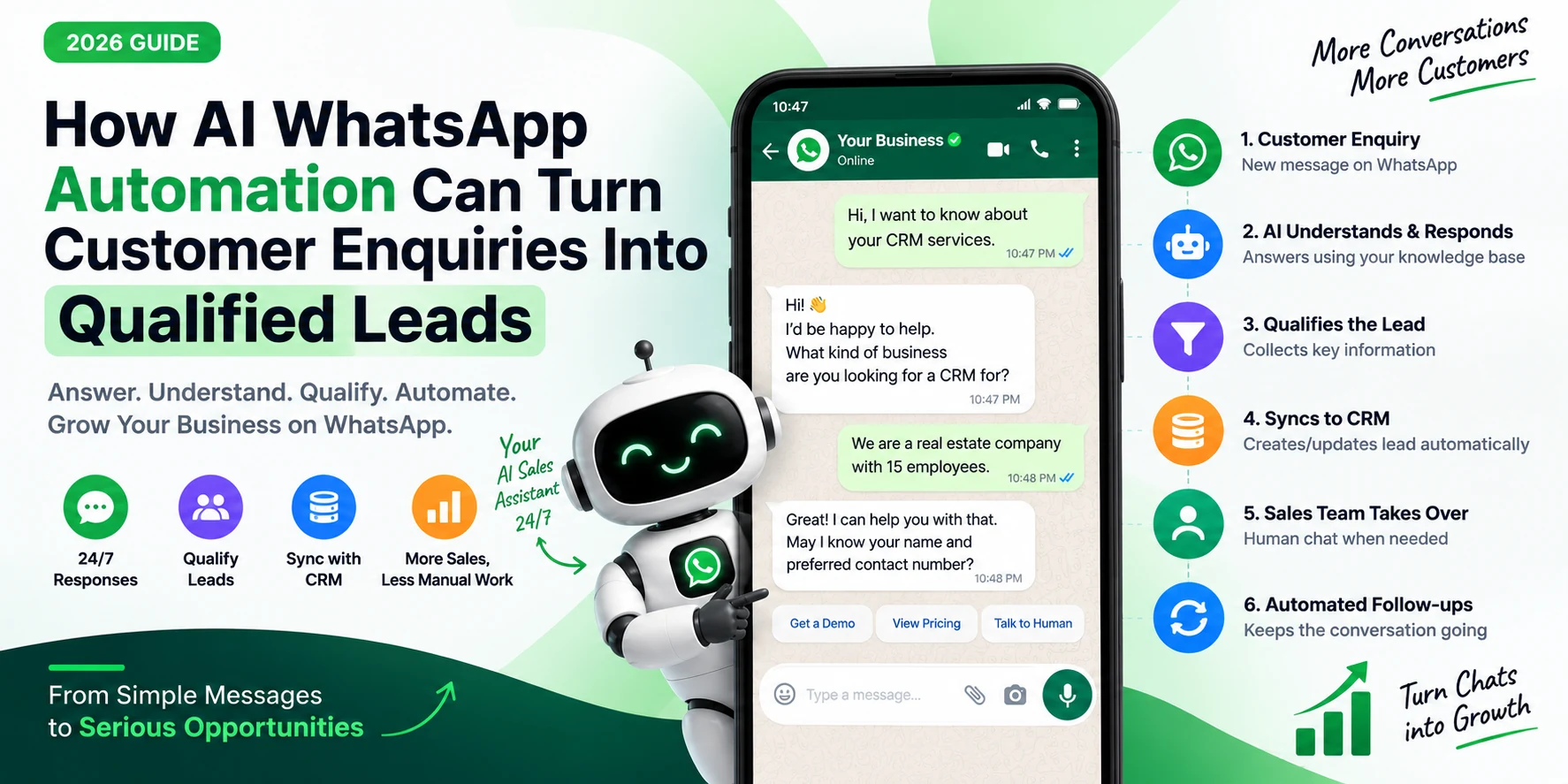
Step 1: Customer Sends a Message
Everything starts with a normal WhatsApp enquiry.
For example:
Customer: "Hi, I want to know about your CRM development services."
Instead of waiting for an employee, the AI can respond immediately.
AI: "Sure, I'd be happy to help. Are you looking for a CRM for your own business or a product you plan to offer to customers?"
The conversation has already started moving forward.
Step 2: AI Understands the Customer's Intent
This is one of the biggest differences between traditional automation and conversational AI.
The customer doesn't necessarily need to select:
Press 1 for CRM
Press 2 for Mobile App
Press 3 for Website
They can simply explain what they need.
For example:
"I run a real estate company. We get leads from Facebook and WhatsApp, but my team isn't following them properly."
From that single message, the system may identify:
- Industry: Real Estate
- Requirement: Lead Management
- Current Channels: Facebook + WhatsApp
- Problem: Poor lead follow-up
- Potential Solution: CRM + Automation
Now the AI can ask a more relevant next question.
Step 3: Answer Questions From Your Business Knowledge
A useful AI assistant shouldn't invent answers.
It should respond using information provided by the business.
That knowledge could include:
- Services
- Products
- Pricing
- FAQs
- Company policies
- Locations
- Working hours
- Product specifications
- Delivery information
- Appointment rules
- Internal instructions
For example:
Customer: "Do you provide support after development?"
The AI can retrieve the relevant information from the business knowledge base and answer accordingly.
This allows businesses to provide consistent answers without requiring an employee to manually respond every time.
Step 4: Qualify the Lead
Answering questions is useful.
But for a sales-focused business, the bigger opportunity is qualification.
The AI can gradually collect information such as:
- Customer name
- Company name
- Business type
- Requirement
- Location
- Budget
- Timeline
- Number of users
- Existing system
- Main business problem
The important word here is gradually.
Don't make the conversation feel like a 15-field form.
Instead of asking:
Name?
Company?
Budget?
Location?
Timeline?
Ask questions naturally as part of the conversation.
Example Conversation
Customer: We need a CRM.
AI: Sure. What kind of business do you operate?
Customer: Real estate.
AI: Got it. How are you currently managing your leads?
Customer: Mostly Excel and WhatsApp.
AI: Understood. Approximately how many team members would use the CRM?
Customer: Around 20.
Within a short conversation, the business already knows much more than it would from a simple "Contact Us" form.
Step 5: Determine Lead Quality
Once enough information is available, the system can categorize the lead.
For example:
Hot Lead
- Clear requirement
- Suitable budget
- Short timeline
- Decision-maker involved
Warm Lead
- Interested
- Requirement identified
- Still researching options
Cold Lead
- General enquiry
- No immediate requirement
- Long-term possibility
The exact qualification rules should depend on the business.
AI doesn't need to make the final sales decision.
It can simply help the team prioritize conversations.
Step 6: Automatically Push the Lead to CRM
This is where automation becomes much more valuable than a standalone chatbot.
Once the required information has been collected, the system can create a CRM lead automatically.
For example:
Name: Rahul Sharma
Business: Real Estate
Requirement: Custom CRM
Team Size: 20
Current System: Excel + WhatsApp
Timeline: 1–2 Months
Lead Status: Qualified
Source: WhatsApp
Your salesperson doesn't need to manually copy information from WhatsApp into the CRM.
The conversation itself becomes the data-entry process.
Step 7: Sales Team Takes Over
AI shouldn't continue talking when a human salesperson is actively handling the conversation.
A practical system can provide something like:
Manual Chat
When the salesperson takes over:
AI → Paused
The employee can then communicate directly with the customer.
Other team members can also see that someone is already handling the lead.
This prevents situations where both AI and a salesperson reply simultaneously.
Step 8: Resume AI When Needed
Human takeover doesn't necessarily need to permanently disable automation.
Once the salesperson finishes the conversation, the system can provide:
Resume AI
Automation can then continue handling future messages according to the configured workflow.
This creates a much more practical model:
AI → Human → AI
Instead of:
AI OR Human
Step 9: Automated Follow-Ups
Many leads aren't lost because the customer said no.
They're lost because nobody followed up.
Imagine a prospect asks about your service and then stops responding.
Automation can trigger follow-ups based on your business rules.
For example:
Day 1
"Hi Rahul, just checking if you had a chance to review the information we shared."
Day 3
Send additional relevant information.
Day 7
Notify the salesperson that the lead hasn't responded.
The objective isn't to spam customers.
It's to ensure valuable opportunities aren't forgotten.
WhatsApp Templates and Outbound Automation
WhatsApp isn't only useful for incoming enquiries.
Businesses can also use approved message templates for permitted outbound communication.
Examples include:
- Appointment reminders
- Payment reminders
- Lead follow-ups
- Subscription expiry reminders
- Order updates
- Event notifications
- Customer re-engagement
For example, a CRM status could trigger a particular message template.
Lead Status: Demo Completed
↓
Follow-Up Template
↓
WhatsApp Message
This connects CRM activity with customer communication.
What Happens When AI Doesn't Know the Answer?
This is extremely important.
AI should not confidently invent information.
If the required answer isn't available in the business knowledge base, the system can:
- Tell the customer that the information needs to be confirmed.
- Record the unanswered question.
- Notify the appropriate team member.
- Allow a human to respond.
- Add the verified answer to the knowledge base if appropriate.
Over time, these unanswered questions can help improve the system.
Multiple Teams and Locations
Automation becomes more interesting for businesses operating across different locations or departments.
Imagine a company has branches in:
- Jaipur
- Delhi
- Mumbai
A lead from Jaipur can automatically be assigned to the Jaipur team.
Employees at that location can see the relevant conversations.
The system can also show which team member is currently chatting with the customer.
This combines WhatsApp communication with internal lead management.
Conversation Summaries
Salespeople shouldn't necessarily have to read 50 messages before understanding a lead.
AI can generate a summary such as:
Customer: Rahul Sharma
Business: Real Estate
Requirement: CRM for 20 users
Current Process: Excel + WhatsApp
Main Problem: Leads aren't being followed up consistently
Timeline: 1–2 months
Status: Interested in demo
Now the salesperson can understand the context in seconds.
WhatsApp Automation Is More Than Auto-Reply
This is where businesses sometimes misunderstand automation.
A simple auto-reply says:
"Thanks for contacting us. Our team will respond shortly."
That's useful.
But it doesn't really automate the business process.
A more complete system can:
Message
↓
Understand
↓
Answer
↓
Collect Information
↓
Qualify
↓
Create CRM Lead
↓
Assign Salesperson
↓
Follow Up
↓
Human Takeover
That's not just a chatbot.
It's a workflow.
Where AI Should NOT Be Used
Not every WhatsApp conversation should be automated.
Human involvement may be better when:
- A customer is angry or frustrated.
- Negotiation is required.
- The request is unusual.
- Sensitive information is involved.
- A high-value customer needs personalized attention.
- AI isn't confident about the answer.
- The customer explicitly requests a human.
Good automation knows when to stop automating.
Start With One Workflow
Don't try to automate your entire WhatsApp operation on day one.
Start with something measurable.
For example:
Phase 1
Incoming Enquiry → FAQ → Lead Qualification → CRM
Measure:
- Response time
- Qualified leads
- Human workload
- Conversion rate
Then expand.
Phase 2
Add:
- Follow-ups
- Templates
- Appointment booking
- Payment reminders
- Customer support
- Reporting
This makes implementation easier and allows the business to see whether automation is actually creating value.
AI + Human Is the Better Model
The goal shouldn't be:
Replace the sales team with AI.
The better model is:
AI handles:
- Immediate responses
- FAQs
- Initial qualification
- Information collection
- Repetitive follow-ups
- CRM data entry
Humans handle:
- Complex requirements
- Product demonstrations
- Negotiation
- Relationship building
- Exceptions
- Closing deals
AI handles volume.
Humans handle value.
Final Thoughts
WhatsApp is already where many customers prefer to communicate with businesses.
The opportunity isn't simply to add another chatbot to it.
The opportunity is to connect the conversation with the rest of the business.
A customer sends a message.
AI understands what they need.
The system answers their questions.
It collects the required information.
The lead appears in the CRM.
The appropriate salesperson takes over.
And automation makes sure the opportunity doesn't disappear because someone forgot to follow up.
That's when WhatsApp stops being just a messaging application.
It becomes part of your sales process.
Don't automate conversations just to reply faster.
Automate them to move customers closer to the right outcome.

Ankiit Janggid
Technical consultant and developer focused on engineering guidance, APIs, AI, and scalable product delivery.
View profile