CallFlow AI – AI Outbound Calling Automation Using n8n
AI Voice Automation / n8n Workflows
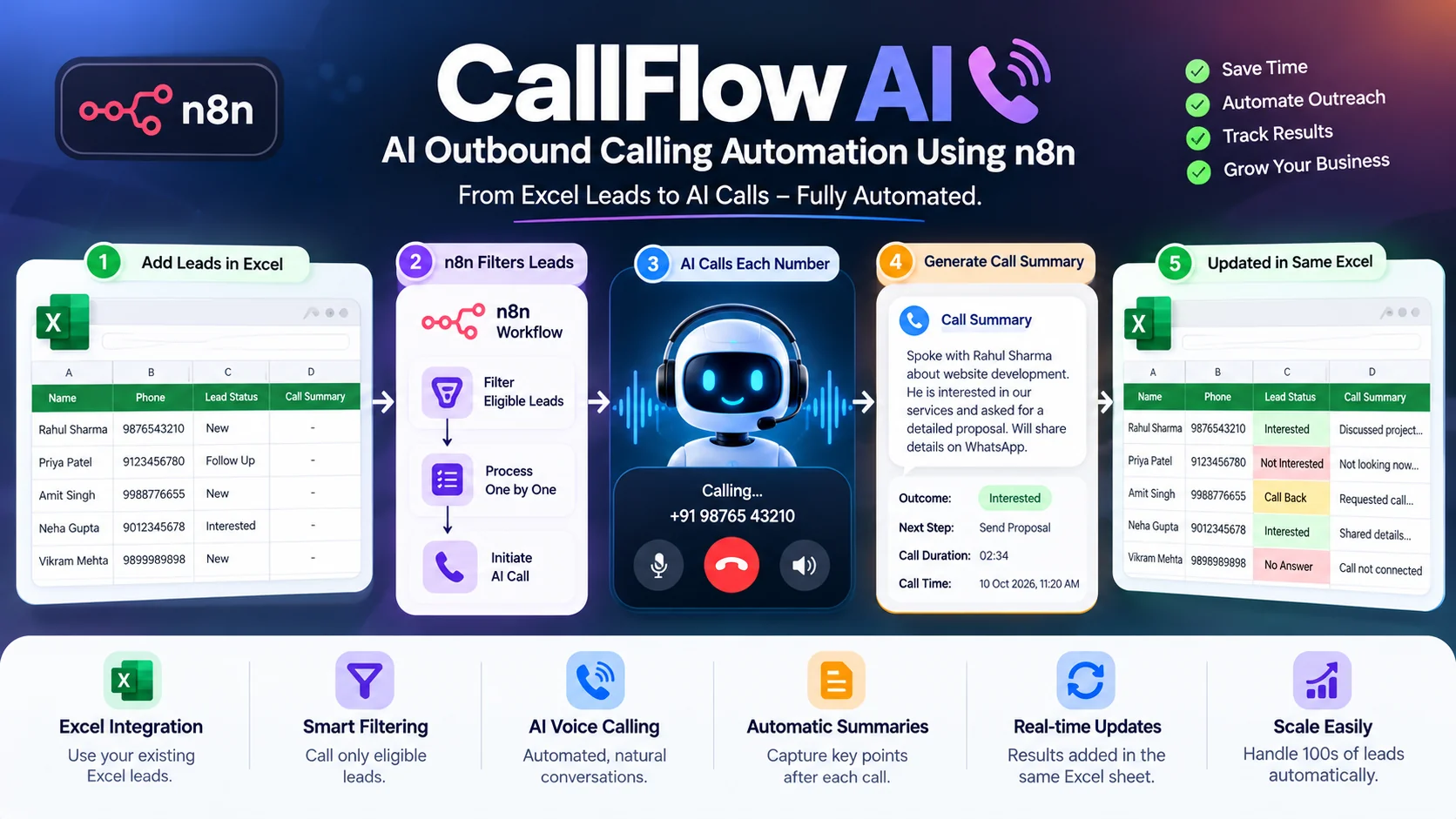
CallFlow AI – AI-Powered Outbound Calling Automation Using n8n
Project Overview
CallFlow AI is an intelligent outbound calling automation solution developed using n8n workflow automation and AI-powered voice calling technology.
The system automates the process of contacting leads, conducting outbound calls, and recording conversation summaries.
Instead of manually dialing individual phone numbers, businesses can maintain their leads in an Excel spreadsheet and allow the automation workflow to manage the calling process.
The n8n workflow reads lead information, applies predefined filters, processes eligible contacts sequentially, initiates outbound calls, and updates the same Excel sheet with the results of each conversation.
This creates a streamlined calling workflow that combines lead management, AI voice automation, and automated reporting.
Core Concept: Excel Leads → Apply Filters → AI Outbound Call → Generate Summary → Update Excel
The Challenge
Businesses frequently rely on manual calling processes for lead qualification, follow-ups, customer outreach, and sales enquiries.
Traditional outbound calling workflows often involve:
-
Manually selecting leads from spreadsheets.
-
Dialing phone numbers individually.
-
Repeating similar conversations with multiple prospects.
-
Recording call notes manually.
-
Updating lead statuses after every conversation.
-
Tracking which leads have already been contacted.
-
Managing follow-up information across spreadsheets.
-
Spending significant time on repetitive calling activities.
These activities can become difficult to manage when working with large lead lists.
The objective was to automate the outbound calling process while maintaining organized lead records and conversation summaries.
The Solution
CallFlow AI uses n8n as the central workflow orchestration engine.
The system connects an Excel-based lead list with an AI voice calling service.
When the automation starts, n8n retrieves the lead records from the spreadsheet and applies predefined filters to identify contacts eligible for calling.
The workflow then processes the selected leads one by one.
For each eligible lead, the system initiates an outbound call through the connected voice calling service.
After the call ends, the workflow retrieves or generates a summary of the conversation and updates the corresponding lead record in the same Excel sheet.
This eliminates the need to manually dial every number and maintain separate call notes.
Key Features
1. Excel-Based Lead Management
Businesses can upload or maintain lead information in a structured Excel spreadsheet.
The spreadsheet serves as the central source for outbound calling data.
2. Automated Lead Filtering
The workflow applies predefined conditions to determine which leads should be contacted.
Filters can be configured using criteria such as lead status, campaign eligibility, or previous calling activity.
3. Sequential Outbound Calling
Eligible leads are processed one by one through the n8n workflow.
This provides an organized calling sequence and helps prevent uncontrolled simultaneous calling.
4. AI-Powered Voice Conversations
The connected AI voice agent communicates with leads during outbound calls.
The agent can be configured for specific business use cases such as lead qualification, follow-up enquiries, or appointment-related outreach.
5. Automated Call Summary Generation
After a call ends, the system obtains a summary of the conversation.
The summary captures important discussion points and relevant lead information.
6. Automatic Excel Updates
The workflow updates the original Excel sheet with the call summary associated with each lead.
This keeps calling information and lead records together.
7. Reduced Manual Calling Effort
The automation eliminates the need for employees to manually dial each eligible phone number.
8. Centralized Call Records
Lead details and call summaries are maintained in the same spreadsheet for convenient tracking and review.
9. Customizable Workflow Filters
The calling process can be adjusted according to business requirements using configurable n8n conditions.
10. API-Based Voice Calling Integration
n8n connects with the voice calling service through APIs and webhooks to initiate calls and process their results.
How CallFlow AI Works
Step 1: Prepare the Excel Lead Sheet
The business maintains a spreadsheet containing lead information.
Example columns:
-
Lead ID
-
Customer Name
-
Phone Number
-
Lead Status
-
Calling Eligibility
-
Call Summary
Step 2: Trigger the n8n Workflow
The automation is initiated according to the configured workflow trigger.
Step 3: Retrieve Lead Records
n8n reads the available lead information from the connected Excel sheet.
Step 4: Apply Lead Filters
The workflow evaluates each lead against the configured calling conditions.
Only eligible leads proceed to the calling stage.
Step 5: Initiate Outbound Call
The workflow sends the selected lead's details to the connected AI voice calling service.
The service initiates an outbound call to the lead's phone number.
Step 6: Conduct AI Voice Conversation
The AI voice agent interacts with the lead according to the configured calling instructions.
Step 7: Process Call Completion
After the conversation ends, the workflow receives the call result through the connected service.
Step 8: Generate Call Summary
The system retrieves or generates a summary highlighting the important points from the conversation.
Step 9: Update the Same Excel Sheet
n8n identifies the corresponding lead record and writes the call summary into the spreadsheet.
Step 10: Process the Next Lead
The workflow continues with the next eligible lead until the selected calling queue has been processed.
Example Business Scenario
A business has 100 leads stored in an Excel spreadsheet.
The calling team wants to contact only leads that meet specific conditions.
Instead of manually reviewing the spreadsheet and dialing numbers, the business starts the CallFlow AI workflow.
The system:
-
Reads the lead spreadsheet.
-
Applies the configured filters.
-
Identifies eligible leads.
-
Initiates an AI outbound call to the first eligible contact.
-
Processes the completed call.
-
Adds the conversation summary to the matching Excel row.
-
Continues with the next eligible contact.
After processing, the business can review the spreadsheet to understand the outcomes of the completed calls.
Example Call Summary
Lead Name: Rahul Sharma
Call Purpose: Website Development Enquiry
Conversation Summary:
"The customer expressed interest in developing a business website. They requested information about available development packages and estimated project timelines. The customer indicated that they would like to discuss the requirements further with the sales team."
Suggested Follow-Up: Sales representative to contact the customer for a detailed requirements discussion.
The summary is illustrative and demonstrates the type of information that can be recorded.
Technical Architecture
1. n8n Workflow Orchestration
n8n coordinates the entire automation process, including lead retrieval, filtering, call initiation, and spreadsheet updates.
2. Excel Integration
A connected Excel file serves as the lead data source and destination for call summaries.
3. Conditional Filtering
Workflow conditions determine which leads qualify for outbound calling.
4. AI Voice Calling Integration
A connected voice calling service manages outbound calls and conversational interactions.
5. REST API Communication
APIs allow n8n to exchange information with the calling service.
6. Webhook-Based Call Results
Webhooks can deliver call completion events and conversation results to the automation workflow.
7. Automated Data Mapping
Each call result is associated with the correct lead record using a stable lead identifier.
8. Sequential Workflow Execution
The system processes eligible contacts in an organized calling sequence.
Technical Highlights
-
n8n workflow automation.
-
Excel-based lead processing.
-
Conditional lead filtering.
-
Sequential outbound call execution.
-
AI voice agent integration.
-
REST API communication.
-
Webhook-based event processing.
-
Automated conversation summarization.
-
Spreadsheet record updates.
-
Lead-to-call result mapping.
-
Workflow orchestration.
-
Business process automation.
Business Benefits
Reduced Manual Calling
Automates repetitive outbound dialing activities.
Faster Lead Outreach
Enables businesses to process eligible lead lists through automated calling workflows.
Automated Call Documentation
Conversation summaries are recorded without requiring employees to manually write call notes.
Centralized Lead Information
Lead records and conversation outcomes remain organized in the same spreadsheet.
Improved Operational Efficiency
Reduces repetitive administrative tasks associated with calling and documentation.
Flexible Business Rules
Lead filters can be adjusted according to different outreach requirements.
Scalable Automation Foundation
Provides a foundation for more advanced CRM integrations and outbound calling workflows.
Responsible Calling & Data Protection
The workflow should only contact leads who have provided appropriate consent or have another valid legal basis for receiving calls.
The system should respect applicable telemarketing rules, calling hours, opt-out requests, and do-not-call requirements.
AI callers should clearly identify themselves, avoid deceptive claims, and provide an appropriate way to reach a human representative.
Call summaries and personal information should be protected through suitable access controls and retention policies.
Future Enhancement Opportunities
The solution can be extended with:
-
Direct CRM integration.
-
Automated follow-up scheduling.
-
Lead qualification scoring.
-
Call outcome classification.
-
Multi-language voice agents.
-
Campaign management dashboards.
-
Call analytics and reporting.
-
Automated retry rules for unanswered calls.
-
WhatsApp follow-up automation.
-
Advanced lead segmentation.
-
Real-time campaign monitoring.
Project Outcome
CallFlow AI demonstrates a practical implementation of workflow automation for outbound business communication.
By connecting Excel-based lead management with AI-powered voice calling and automated conversation summaries, the solution reduces repetitive calling activities and simplifies call documentation.
The project showcases hands-on experience in n8n automation, API integrations, AI voice workflows, conditional data processing, and automated spreadsheet management.
Project Availability
This is a private business automation solution.
The n8n workflows, calling integrations, and lead information are not publicly accessible.
A demonstration can be provided using sample lead data and a controlled test calling environment.