DevOps
How I Host Multiple Node.js Applications on a Single AWS Lightsail Server
Running a separate server for every project can quickly become expensive and difficult to manage. In this article, I share how I host multiple Node.js applications on a single AWS Lightsail server using Apache Virtual Hosts and PM2.
reases infrastructure costs and management overhead.
Over the years, I've adopted a simpler and more cost-effective approach: hosting multiple Node.js applications on a single AWS Lightsail server.
In this article, I'll walk through the architecture and workflow I use to manage multiple production applications efficiently.
Why AWS Lightsail?
AWS offers many hosting options, but Lightsail provides:
- Predictable monthly pricing
- Simple server management
- Easy scaling
- Full root access
- Reliable performance
For small to medium-sized applications, Lightsail is often more than sufficient.
My Hosting Architecture
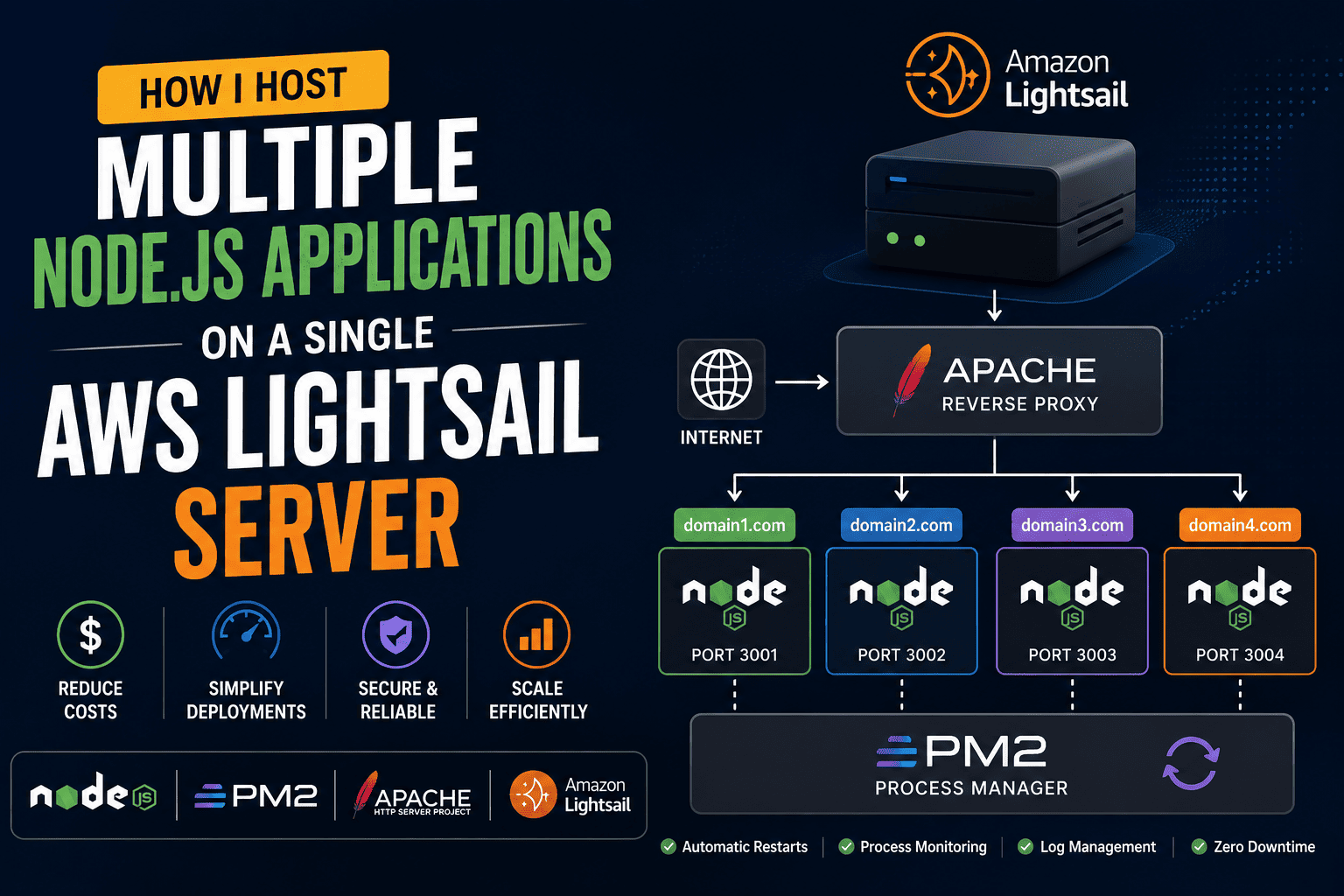
Here's a simplified version of my setup:
Internet
    │
    ▼
Apache Server
    │
    ├── domain1.com  → Node App #1
    ├── domain2.com  → Node App #2
    ├── domain3.com  → Node App #3
    └── domain4.com  → Node App #4

PM2 manages all applications
Each application runs on a different internal port, while Apache handles incoming requests and routes them to the correct application.
Server Structure
I typically organize projects like this:
/var/www/
├── project1
├── project2
├── project3
└── project4
Each project has:
- Separate source code
- Independent environment variables
- Dedicated PM2 process
- Separate Git repository
This keeps deployments clean and manageable.
Using PM2 for Process Management
PM2 is one of my favorite tools for Node.js deployments.
Benefits include:
- Automatic restarts
- Process monitoring
- Log management
- Startup scripts
- Zero-downtime restarts
Example:
pm2 start app.js --name project1
pm2 start app.js --name project2
pm2 save
pm2 startup
Even after a server reboot, all applications automatically restart.
Apache Virtual Hosts
Instead of exposing application ports directly, Apache acts as a reverse proxy.
Example:
<VirtualHost *:80>
    ServerName project1.com

    ProxyPass / http://localhost:3001/
    ProxyPassReverse / http://localhost:3001/
</VirtualHost>
Another application:
<VirtualHost *:80>
    ServerName project2.com

    ProxyPass / http://localhost:3002/
    ProxyPassReverse / http://localhost:3002/
</VirtualHost>
This allows multiple domains to share the same server while serving different applications.
SSL Configuration
Every production website should use HTTPS.
I typically use Let's Encrypt certificates because they are:
- Free
- Trusted
- Easy to renew
After SSL setup:
http://domain.comautomatically redirects to:
https://domain.comCommon Mistakes to Avoid
Running Applications Without PM2
If your Node.js process crashes, the application becomes unavailable.
PM2 solves this problem.
Exposing Internal Ports
Never expose application ports directly to the public internet unless absolutely necessary.
Use a reverse proxy.
Ignoring Logs
Monitoring logs helps identify:
- Memory leaks
- Failed requests
- Database issues
- Unexpected crashes
Hosting Everything as Root
Always follow proper permission management and security practices.
Performance Benefits
This setup provides:
- Lower infrastructure costs
- Easier server management
- Centralized monitoring
- Better resource utilization
- Faster deployments
For many business applications, a single Lightsail instance can comfortably host multiple Node.js projects.
When Should You Use Separate Servers?
While this setup works well, there are situations where dedicated servers make sense:
- High-traffic applications
- Strict security requirements
- Resource-intensive workloads
- Enterprise environments
As applications grow, scaling horizontally becomes more important.
Final Thoughts
Hosting multiple Node.js applications on a single AWS Lightsail server has saved me time, money, and operational complexity.
Combined with Apache Virtual Hosts and PM2, it provides a reliable and scalable deployment strategy for small and medium-sized projects.
If you're managing multiple applications and looking to reduce hosting costs without sacrificing reliability, this setup is definitely worth considering.
What's your preferred deployment strategy for Node.js applications? I'd love to hear your experience.

Ankiit Janggid
Technical consultant and developer focused on engineering guidance, APIs, AI, and scalable product delivery.
View profile